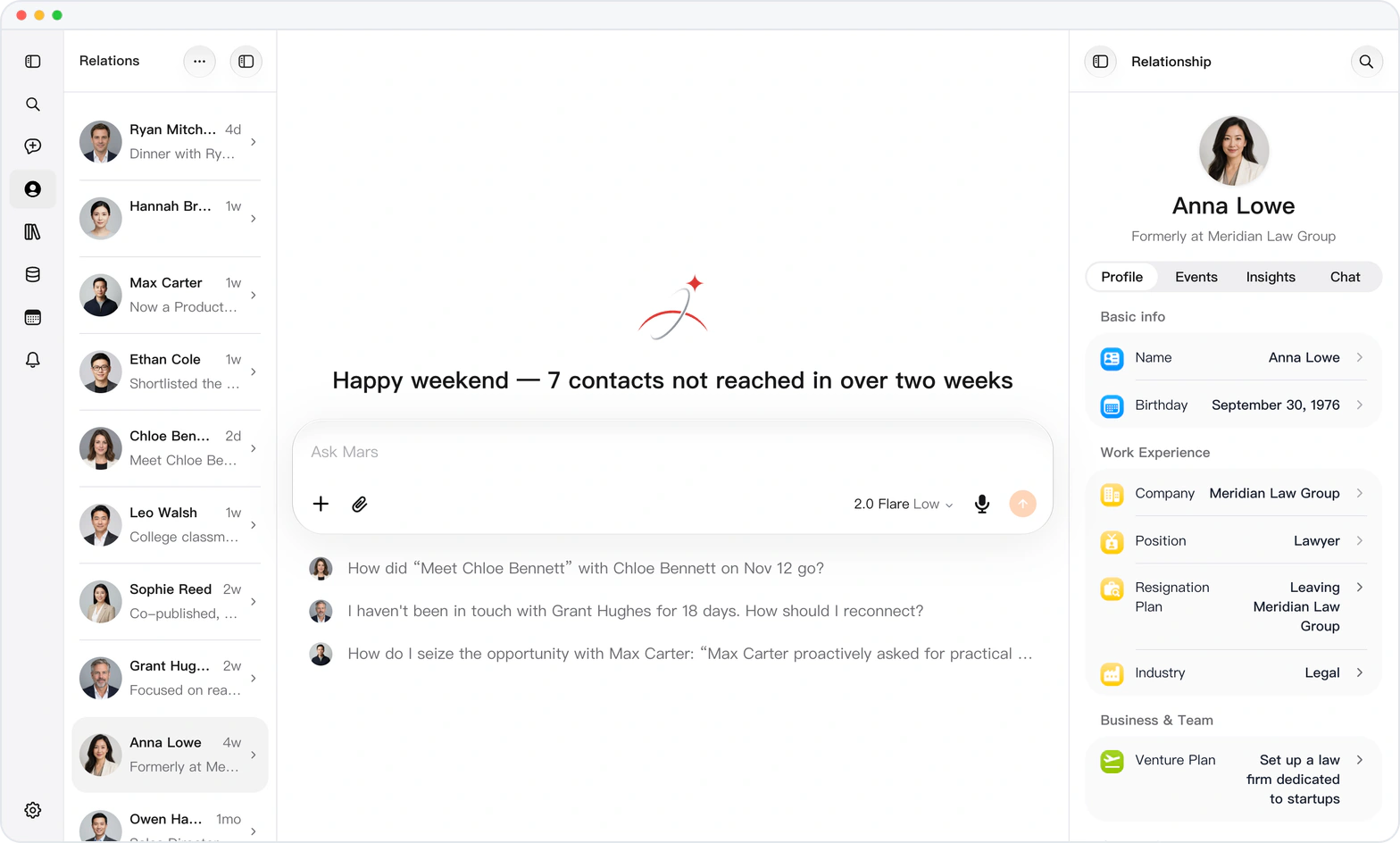
Find what you know about anyone, fast
When everything lands in Other, the detail you need is always buried.
The crowded Work and Other groups are split into Business & Team, Tech & Tools, and Mindset & Preferences. A custom field goes into the group its name describes and takes that group's colour, on the web and on iOS. Every group is shorter, so there is no long list to wade through.
Before a business meeting: read Business & Team
Before a pitch or a partnership call, open the person's information and go straight to Business & Team. The company they run, the projects they are building, how their team is made up and who their customers are sit together in one short group, apart from family and personal details. You walk in knowing what they are working on, without scrolling through everything else Mars has learned about them.
Talking shop with a builder: check Tech & Tools
Tech & Tools holds the devices, development tools, technical preferences, cloud services and domains a person has mentioned. Before a technical conversation, one look shows what they already work with, so a suggestion or an introduction can fit their stack instead of starting from zero.
Before you propose: read Mindset & Preferences
Mindset & Preferences collects how someone thinks and works: their management ideas, working preferences, decision habits and the way they like to see an analysis. Read it before you send a proposal, and you can frame it the way they prefer to decide, rather than the way you would.
Each group is short enough to scan at a glance, so you find the detail fast.
See the rest of the October 17 release in the changelog.