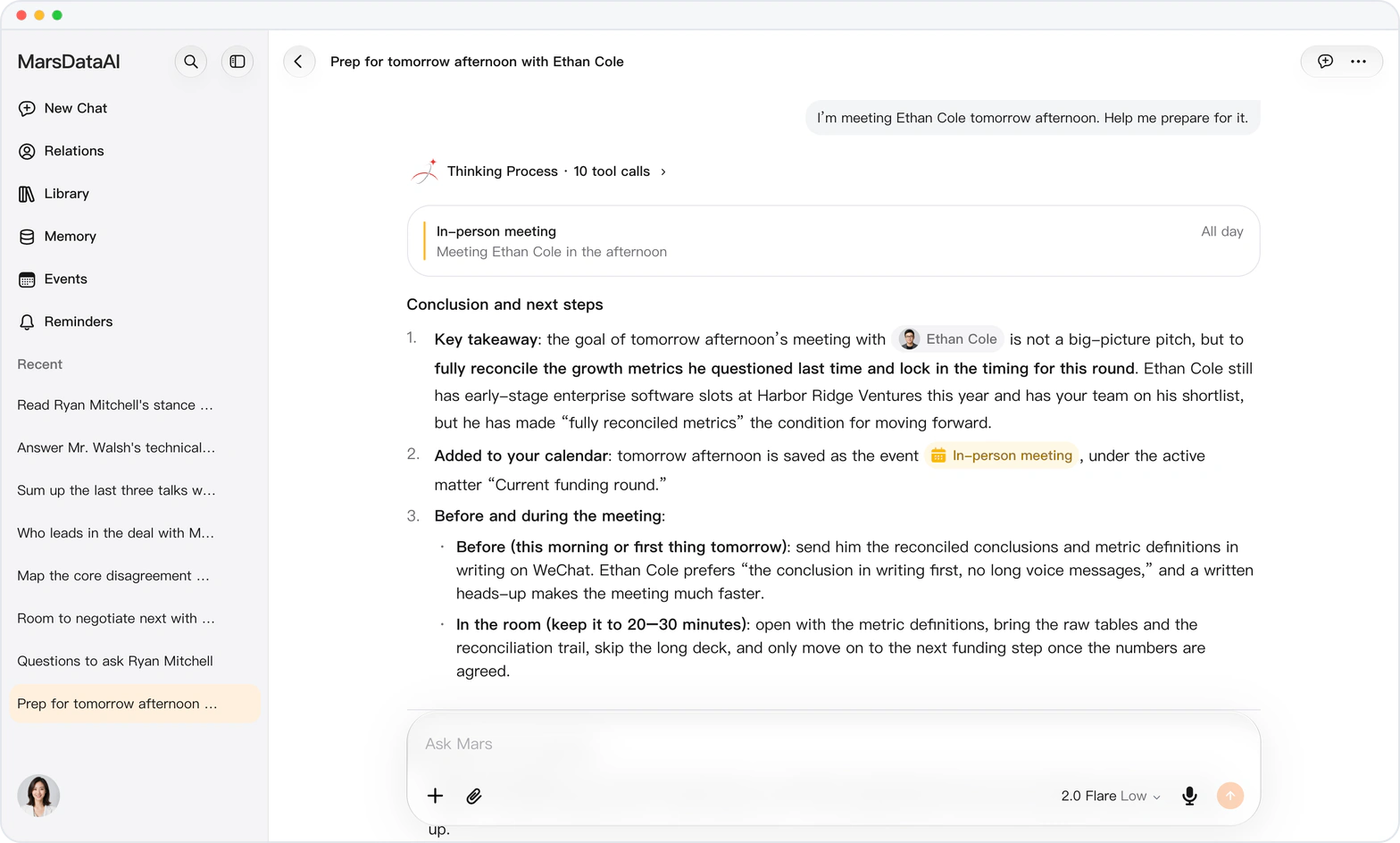
How to do meeting preparation in one ask
Half an hour of notes before, half a day finding the words after. MarsDataAI handles meeting preparation and follow-ups in seconds.
Before a call or a coffee, ask MarsDataAI to prepare you: it turns the person's profile groups, recent insights, open reminders and past conversations into one concise brief. For the follow-up, MarsDataAI drafts the message in a copy-ready card that matches your tone and the commitments you actually made, not a one-size-fits-all template.
Meeting preparation: how MarsDataAI builds your brief
Ask MarsDataAI for meeting preparation with the person's name, and it starts from the record you already keep. Profile groups show who they are and how you know them. Each insight carries a type, such as opportunity, risk, need, budget or decision, and every item on the contact page links to its source, so you can check a fact before you rely on it. Open reminders and past conversations complete the picture. You get one concise brief, ready to read before the call starts.
Before a first call: meeting preparation with little history
A first call often starts with only a name, a company and a short chat. Ask MarsDataAI for meeting preparation anyway: it reads what you saved, such as the chat, a screenshot or a shared file, and separates what the person actually said from what is still unknown. The brief then suggests the questions that would clarify the most useful unknown, such as their role in a decision or the outcome they want. MarsDataAI does not fill gaps with guesses: a missing budget stays unknown, and a friendly contact is not assumed to be the decision maker.
Meeting someone again after a long gap
When you meet someone again after months, the details are spread across events, insights and old conversations. Ask MarsDataAI to prepare the meeting, and the brief puts that history in one place: what you last discussed, what each of you promised, and which reminders are still open. Every point links to its source, so you can check an old fact before you repeat it. State your goal, and MarsDataAI compares whether to advance, maintain or pause the relationship, then suggests a low-cost opening that reconnects naturally.
After the meeting: recordings, notes and the follow-up
After the meeting, bring MarsDataAI what you have: a voice note, a meeting recording, a screenshot of the chat or your own notes. MarsDataAI turns it into insights, risks and a concrete next step, and points out the needs, objections and commitments that came up. Then ask for the follow-up. For an email, the draft card carries the recipient, Cc and subject, and Open in Gmail fills a compose window for you to review; MarsDataAI never sends mail. For a chat app, copy the card and send it yourself.
Follow-ups that match what you agreed
After the meeting, ask MarsDataAI for a follow-up and it drafts the message as a copy-ready card. The wording matches your usual tone with this person and the commitments you actually made, not a one-size-fits-all template. Share the audience and the outcome you want for a more precise draft. The card is editable, so you can adjust a line first. Then copy it and send it yourself from the app you normally use. Keeping the draft in one card means the follow-up is ready the moment you need it.
Dating app openers from their profile
The same copy-ready card works before a first date as well as a first meeting. Share a screenshot of a new match's profile or the empty chat and ask for an opener: MarsDataAI picks one concrete detail they wrote or posted, links it to something true about you that you have told MarsDataAI, and ends on an open question, instead of a bare "hi" that gives them nothing to answer. You get two or three versions in different tones; edit one, copy it and send it yourself. When they reply, share the answer and MarsDataAI suggests the next line. The AI relationship coach page under Use cases in this Wiki walks through a full example.
When a brief helps most, and what stays yours
A brief helps most before a first call or a meeting after a long gap, because the history is spread across events, insights and chats. You decide what to say and when to say it. MarsDataAI drafts and you edit: the card is editable, and nothing is copied anywhere until you choose Copy. Insights are pinned rather than hidden, and pinned and unread insights come first, so the freshest points stay visible.
Every conversation is prepared and personal, and the other side can tell.
See the rest of Relationship Insights & Opportunities in MarsDataAI Wiki.