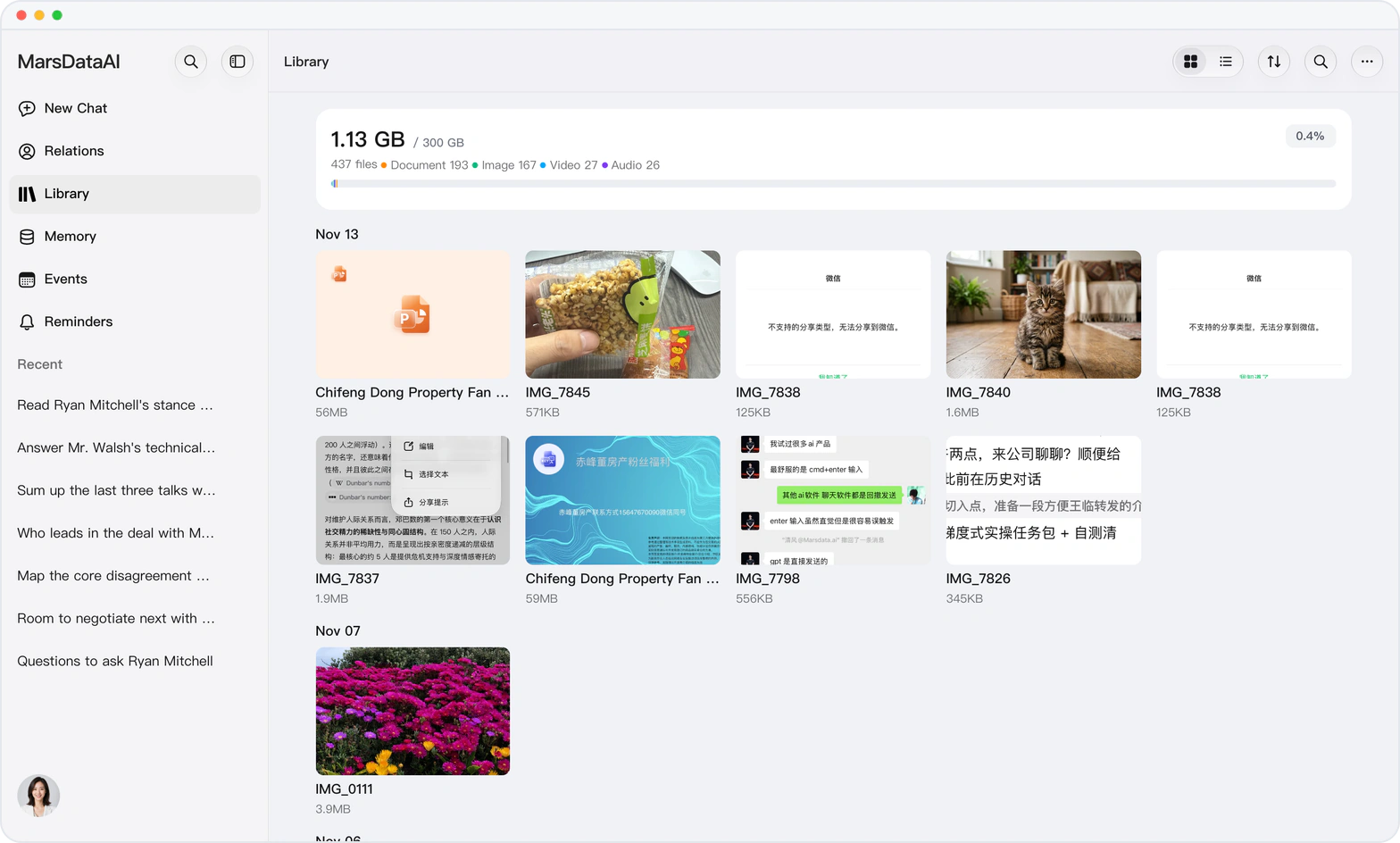
Where are my files? Inside the AI file manager
Files scattered across chats take forever to find. This AI file manager keeps your uploads and MarsDataAI output in one sortable Library.
Open the Library to browse every document, spreadsheet, presentation, picture and recording, filter by category, or sort by date, kind, name or size. Markdown, text and JSON files MarsDataAI writes go straight into the Library and open in a rich preview, ready to download or print in one tap, with no export to another tool.
Document preview without leaving the Library
Open any file in the Library for a rich preview. Images, PDFs, Office files, Keynote, Pages, Numbers and WPS files show their first page, and Markdown, text and JSON files open in a rich preview too. RAR and ZIP files show their contents as a listing, and CSV tables are previewed directly. Markdown, text and JSON files can be printed straight from the preview. Files can also be downloaded from the Library in their original form, so you can share them without re-exporting anything.
Search, sort and select files in one place
This AI file manager lets you browse every document, spreadsheet, presentation, picture and recording, then filter by category or sort by date, kind, name or size. Search and multi-select work across the Library, so you can download or delete several files at once. MarsDataAI writes Markdown, text and JSON files straight into the Library, and a Word document arrives in the MarsDataAI style with lists and illustrations. Review your selection before you delete, so nothing goes by mistake.
Original names kept, and every file in reach
Every uploaded file keeps its original name, so the Library matches what you sent. Files MarsDataAI writes sit beside them, and you can select several at once to download or delete. Review the selection before you delete, because a multi-select action covers every file you ticked. Search and sort keep a growing library easy to navigate. Older .doc and .ppt files can still be read, so a legacy document does not need to be replaced before you open it.
Deliverables and references stay organized, ready to view, share or print.
See the rest of Library & Document Editing in MarsDataAI Wiki.