How to create a Feishu bot for Bitable and chat
Spend hours keeping Feishu tables up to date? Scan one QR code to create your own Feishu bot: MarsDataAI chats in Feishu and builds and fills Bitable bases.
Open Connected Platforms, tap Connect on the Feishu row and scan the QR code with Feishu, or tap Open in Feishu on a phone. Feishu creates a MarsDataAI bot in your own workspace and MarsDataAI greets you there. Send it text, pictures, files or voice and it answers like the app; your reminders arrive in the same chat. Ask MarsDataAI to create a Bitable base with typed fields, add or update up to 500 records at once, or filter and sort what is already there. To work on an existing base, add the MarsDataAI bot as a collaborator from the base's Share menu.
Create your Feishu bot with one scan
In Settings, open Connected Platforms and tap Connect on the Feishu row, on the web or in the iPhone and iPad app. Scan the QR code with the Feishu app and confirm; on a phone with Feishu installed, tap Open in Feishu instead. Feishu creates a bot named MarsDataAI inside your own Feishu workspace, and the page returns to Connected Platforms once Feishu confirms. MarsDataAI then sends a welcome message in Feishu. The bot's credentials stay with MarsDataAI and never reach your browser. An expired or cancelled code refreshes with one tap.
Let MarsDataAI build and fill Bitable bases
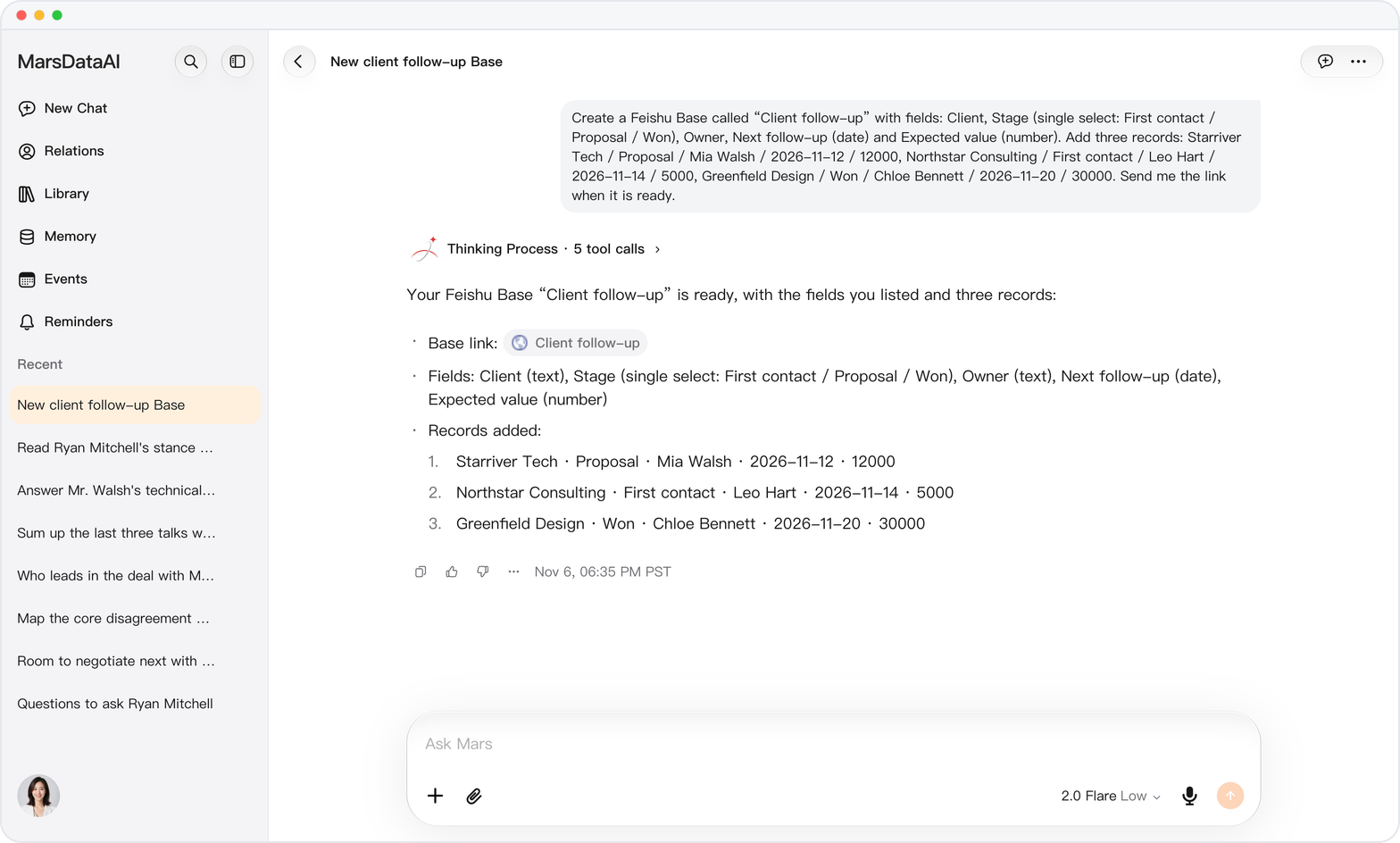
Describe the table you need, such as a client follow-up list with name, stage, owner and next date, and MarsDataAI creates the base with typed fields and gives you its link. Ask it to add or update records in batches of up to 500, rename or add tables and fields, or read records with filters and sorting to answer a question. A base MarsDataAI creates belongs to you. MarsDataAI reads a base before changing it and writes values by field name, so columns stay where you expect them.
Add the bot as a collaborator to finish the loop
To let MarsDataAI work on a base you already have, open that base in Feishu, choose Share, then Add collaborators, search for your MarsDataAI bot and give it edit access. Then paste the base link to MarsDataAI in chat, in Feishu or in the app, and ask for the change you need. If the bot cannot open a base, MarsDataAI tells you this step. MarsDataAI answers only you, in your one-to-one chat with the bot, so your requests stay private.
Your Feishu tables fill themselves while you talk, and MarsDataAI works where your team already works.
See the rest of Connected Platforms & Sync in MarsDataAI Wiki.